Set up the senior display
Pair a tablet to the household and choose the information and trusted people that should appear.
Technology designed around the person
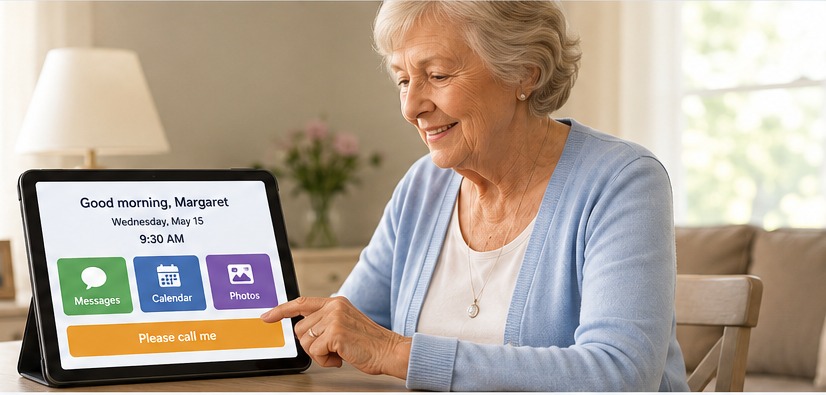
Senior Companion gives an older adult one calm, familiar screen for the day ahead, trusted people and simple requests for help—while family and caregivers manage everything remotely.
Designed for orientation, communication and reassurance—not as a medical device or substitute for emergency services.
How it works
Senior Companion deliberately keeps complexity away from the senior. The tablet shows only what is useful; the caregiver portal handles schedules, trusted people, messages and device setup.
Pair a tablet to the household and choose the information and trusted people that should appear.
Update the day, send reassurance, manage trusted contacts and receive requests from anywhere.
Day, date, time, today's schedule, helpful reminders and large familiar actions stay easy to find.
See it in action
These demonstration screens use fictional names and information. No real household or caregiver data is shown.
Senior tablet
Susan will visit this afternoon.
Everything is okay.Caregiver portal
Times shown in Margaret's household timezone.
Features
A large always-visible orientation point that follows the senior household's timezone.
Appointments and plans appear in chronological order with meaningful details preserved.
Large buttons use real photos and relationship labels to make recognition easier.
One tap can send “Please call me,” “I need some help,” or another preset request.
Caregivers see requests together and can see who handled a message and when.
Family can send a clear message that remains available in Good to know after it is acknowledged.
For families and caregivers
Senior Companion is being built for families supporting an older adult who may find ordinary tablets, smartphones and app menus difficult or overwhelming.
Senior Companion is in development
We are building Senior Companion around real family caregiving needs, with simplicity for the senior and practical remote tools for the people supporting them.